
Colección: Thermal Shipping Labels | Direct Thermal, Transfer Labels & Ribbons
Print shipping labels, barcodes, inventory tags and warehouse identification with thermal shipping labels from Gpack Supplies. This collection includes direct thermal labels, thermal transfer labels, colored shipping labels, printer ribbons and a commercial desktop thermal transfer printer.
Choose from label sizes ranging from 2" x 1" to 4" x 6", including white, yellow, orange, green and blue options. Available roll configurations include 1-inch and 3-inch cores for desktop and industrial labeling applications.
Direct thermal labels print without a ribbon and are ideal for shipping, fulfillment and short-term barcode applications. Thermal transfer labels use a compatible ribbon to produce more durable printed information for inventory, warehouse racks, product identification and longer-term labeling.
Local pickup and fast delivery options available in Miami and Broward.

-
Direct Thermal Labels – 2 x 1 – White – 12 Rolls – 1 Core
Precio habitual $55.00 USDPrecio habitual -
Direct Thermal Labels – 2.25 x 1.25 – White – 12 Rolls – 1 Core
Precio habitual $55.00 USDPrecio habitual -
Direct Thermal Labels – 2 x 2 – White – 12 Rolls – 1 Core
Precio habitual $55.00 USDPrecio habitual -
Direct Thermal Labels – 4 x 3 – White – 16 Rolls
Precio habitual $85.00 USDPrecio habitual -
Direct Thermal Labels – 4 x 5 – White – 10 Rolls – 1 Core
Precio habitual $85.00 USDPrecio habitual -
Direct Thermal Labels – 4 x 6 – White – 9 Rolls – 1 Core
Precio habitual $85.00 USDPrecio habitual -
Direct Thermal Labels – 4 x 6 – White – 12 Rolls – 1 Core
Precio habitual $65.00 USDPrecio habitual -
Direct Thermal Labels – 4 x 3 – Yellow – 16 Rolls – 1 Core
Precio habitual $105.00 USDPrecio habitual -
Direct Thermal Labels – 4 x 5 – Yellow – 10 Rolls – 1 Core
Precio habitual $95.00 USDPrecio habitual -
Direct Thermal Shipping Labels – 4 x 6 – Yellow – 9 Rolls – 1 Core
Precio habitual $85.00 USDPrecio habitual -
Direct Thermal Labels – 4 x 6 – Orange – 9 Rolls – 1 Core
Precio habitual $85.00 USDPrecio habitual -
Direct Thermal Labels – 4 x 6 – Green – 9 Rolls – 1 Core
Precio habitual $95.00 USDPrecio habitual -
Direct Thermal Labels – 4 x 6 – Blue – 9 Rolls – 1 Core
Precio habitual $95.00 USDPrecio habitual -
Direct Thermal Labels – 4 x 6 – White – 4 Rolls – 3 Core
Precio habitual $85.00 USDPrecio habitual -
Direct Thermal Labels – 4 x 6 – Yellow – 4 Rolls – 3 Core
Precio habitual $105.00 USDPrecio habitual -
Direct Thermal Labels – 4 x 6 – Orange – 4 Rolls – 3 Core
Precio habitual $95.00 USDPrecio habitual -
Direct Thermal Labels – 4 x 6 – Green – 4 Rolls – 3 Core
Precio habitual $95.00 USDPrecio habitual -
Thermal Transfer Labels – 4 x 6 – White – 4 Rolls – 3 Core
Precio habitual $85.00 USDPrecio habitual -
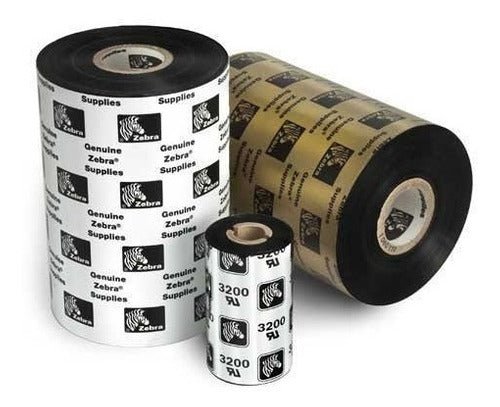
Ribbon for Thermal Transfer Printers
Precio habitual A partir de $105.00 USDPrecio habitual -
Honeywell PC42E-T Thermal Transfer Label Printer – Desktop Barcode Printer
Precio habitual $295.00 USDPrecio habitual -
Fan Fold Direct Thermal Labels – 4 x 6 – White – 4,000 Labels/Case
Precio habitual $70.00 USDPrecio habitual




Thermal Shipping Labels for Barcodes, Packages and Warehouse Operations
Thermal shipping labels provide a fast and reliable way to print carrier labels, barcodes, inventory identification, product information and warehouse tracking data. They are widely used by e-commerce businesses, fulfillment centers, manufacturers, retailers, distributors and logistics operations that need clear, scannable labels for daily shipping and inventory workflows.
Gpack Supplies offers direct thermal labels, thermal transfer labels, colored shipping labels, printer ribbons and thermal label-printing equipment. Available label sizes range from compact 2" x 1" formats to standard 4" x 6" shipping labels used for UPS, USPS, FedEx and other parcel-carrier applications.
The collection includes white, yellow, orange, green and blue label options. Colored labels can help businesses identify priorities, departments, product groups, routes, returns and special warehouse instructions without depending only on printed text.
Label rolls are available with 1-inch and 3-inch cores. The correct roll dimensions, core size, outer diameter, sensing method and print technology must match the printer being used.
What Are Thermal Shipping Labels?
Thermal shipping labels are pressure-sensitive adhesive labels designed for printing with direct thermal or thermal transfer printers. Instead of using ink cartridges or toner, thermal printers create images through controlled heat.
Direct thermal labels contain a heat-sensitive coating that darkens when exposed to the printer’s thermal printhead. Thermal transfer labels receive the printed image from a heated ribbon that transfers ink onto the label surface.
Both technologies can produce crisp text, barcodes, addresses and tracking information. The correct choice depends on label life, exposure conditions, abrasion resistance and whether a ribbon-free printing process is preferred.
Thermal labels are commonly supplied on rolls because roll-fed printing supports fast, continuous production. Businesses can print individual labels or large batches depending on order volume and printer settings.
Thermal Label Products Available from Gpack Supplies
| Label Product | Color | Core | Recommended Applications |
|---|---|---|---|
| 2" x 1" Direct Thermal Labels | White | 1" | Product identification, small barcodes, inventory and shelf labels |
| 2.25" x 1.25" Direct Thermal Labels | White | 1" | Retail labels, pricing, inventory identification and small packages |
| 2" x 2" Direct Thermal Labels | White | 1" | Square barcodes, QR codes, bin labels and product identification |
| 4" x 3" Direct Thermal Labels | White or yellow | 1" | Warehouse identification, carton labels, product routing and inventory |
| 4" x 5" Direct Thermal Labels | White or yellow | 1" | Carton labels, large barcodes, warehouse instructions and shipping documents |
| 4" x 6" Direct Thermal Shipping Labels | White, yellow, orange, green or blue | 1" or 3" | Carrier labels, e-commerce shipping, pallet identification and warehouse routing |
| 4" x 6" Thermal Transfer Labels | White | 3" | Longer-term barcodes, inventory, warehouse racks and durable identification |
| Thermal Transfer Printer Ribbon | Varies by ribbon | Printer-specific | Printing thermal transfer labels with compatible printers and media |
| Honeywell PC42E-T Thermal Transfer Printer | Desktop printer | Model specifications apply | Shipping, barcode, inventory and warehouse label printing |
Direct Thermal Labels vs. Thermal Transfer Labels
Direct Thermal Labels
Direct thermal labels contain a chemically treated surface that changes color when heated by the printer. They do not require ink, toner or a separate ribbon.
This ribbon-free process makes direct thermal printing convenient for shipping labels, receipts, order identification, temporary inventory labels and other applications where the printed information does not need to remain readable for an extended period.
Direct thermal labels can be affected by heat, direct sunlight, friction, oils and certain chemicals. Over time, the printed image may fade or darken depending on storage and exposure conditions.
Thermal Transfer Labels
Thermal transfer printing uses a heated ribbon to transfer an image onto the label material. The ribbon and label must be compatible with each other and with the printer.
Thermal transfer labels are often selected when the barcode, text or product information must remain readable for a longer period or resist more abrasion and handling than a direct thermal image.
This technology is commonly used for warehouse racks, long-term inventory, product identification, asset tracking, manufacturing and industrial labeling.
Which Printing Method Should You Choose?
Choose direct thermal labels for shipping, fulfillment and other short-term applications where ribbon-free convenience is the priority. Choose thermal transfer labels when longer print life and greater resistance are needed.
Direct Thermal and Thermal Transfer Comparison
| Feature | Direct Thermal | Thermal Transfer |
|---|---|---|
| Ribbon required | No | Yes |
| Common use | Shipping labels, receipts and short-term identification | Inventory, product labels and longer-term identification |
| Print durability | Suitable for short-term use | Generally more durable when media and ribbon are correctly matched |
| Heat sensitivity | Higher | Lower depending on label and ribbon construction |
| Consumables | Labels only | Labels and compatible ribbon |
Why 4" x 6" Thermal Shipping Labels Are Common
The 4" x 6" format is widely used for parcel shipping because it provides enough space for recipient information, carrier routing data, tracking numbers and scannable barcodes.
Many e-commerce platforms, shipping programs and carrier systems generate labels in a 4" x 6" layout. Businesses can print these labels directly from compatible software without resizing a full letter-size sheet.
Four-by-six labels are commonly applied to corrugated boxes, poly mailers, bubble mailers, padded envelopes and other shipping containers. The package surface should be flat, clean and large enough for the label to remain visible.
Gpack Supplies offers white and colored 4" x 6" direct thermal labels in multiple roll and core configurations, plus white thermal transfer labels for longer-term printing applications.
Common Uses for Small Thermal Labels
2" x 1" Thermal Labels
Two-by-one labels are useful for small barcodes, product numbers, inventory locations, pricing and identification on compact products or containers.
2.25" x 1.25" Thermal Labels
This slightly larger format provides additional room for text, pricing, SKU information and barcodes while remaining compact enough for retail and inventory applications.
2" x 2" Thermal Labels
Square 2" x 2" labels are practical for QR codes, square barcodes, warehouse bins, product identification and other applications where equal width and height are useful.
4" x 3" Thermal Labels
Four-by-three labels provide space for larger barcodes, warehouse instructions, carton identification, route information and product tracking.
4" x 5" Thermal Labels
Four-by-five labels offer a larger printable area for carton identification, shipping information, warehouse instructions and product labeling when a full 4" x 6" carrier label is unnecessary.
Colored Thermal Shipping Labels
Colored labels help warehouse teams identify packages and inventory visually before reading the printed information. Gpack Supplies offers selected direct thermal sizes in yellow, orange, green and blue.
Yellow Thermal Labels
Yellow labels provide high contrast and are often used for priority orders, warnings, inspection status, returns or special handling identification.
Orange Thermal Labels
Orange labels can identify urgent shipments, exceptions, warehouse holds, special routes or products requiring additional attention.
Green Thermal Labels
Green labels may be used for approved products, completed inspections, specific departments, recyclable items or internal routing categories.
Blue Thermal Labels
Blue labels can support route separation, departmental identification, cold-storage workflows, customer groups or other internal classification systems.
Color meanings should be standardized within the business. Post a simple warehouse reference chart so employees understand how each color is used.
Understanding 1-Inch and 3-Inch Label Cores
1-Inch Core Label Rolls
One-inch-core rolls are commonly used with compact desktop thermal printers. They generally have a smaller outside diameter and are easier to store near individual packing stations.
Desktop printers often use shorter rolls because their internal media compartments are smaller. The exact roll width and outside diameter must still match the printer specifications.
3-Inch Core Label Rolls
Three-inch-core rolls are commonly associated with larger-capacity or industrial printer configurations. These rolls can reduce the frequency of media changes in high-volume operations.
A 3-inch core does not fit every printer. Confirm the printer’s media holder, maximum outside diameter and sensing system before purchasing labels.
Why Core Size Matters
The label size may be correct while the core or roll diameter is incompatible with the printer. Always verify width, core diameter, roll direction and maximum outside diameter together.
Thermal Transfer Printer Ribbons
Thermal transfer ribbons contain the ink formulation that is heated and transferred onto the label surface. The ribbon width, length, winding direction, core and material formulation must match the printer and label media.
Common ribbon categories include wax, wax-resin and resin. Wax ribbons are generally used for standard paper labels, while wax-resin and resin formulations may provide greater durability for more demanding applications.
Using an incorrect ribbon can produce faded printing, smearing, poor barcode quality or excessive printhead wear. Match the ribbon to the label material and required resistance level.
Direct thermal labels should not be printed with a ribbon. Thermal transfer labels normally require one unless the printer is being operated in a different supported mode.
Honeywell PC42E-T Thermal Transfer Label Printer
The Honeywell PC42E-T is a desktop thermal transfer barcode-label printer intended for shipping, warehouse, retail and inventory applications. Thermal transfer capability allows the printer to produce durable labels using compatible ribbon and media.
Desktop thermal printers are useful for packing stations, shipping offices, retail counters and light manufacturing environments where employees need fast access to labels without using a full-size office printer.
Before purchasing labels or ribbons, confirm the printer’s supported media width, core size, maximum roll diameter, ribbon specifications, connectivity and software compatibility.
Printer settings such as darkness, speed, sensing mode and label dimensions should be adjusted according to the media. Correct calibration helps prevent skipped labels, poor print quality and alignment errors.
Common Applications for Thermal Labels
E-Commerce Shipping
Online retailers use 4" x 6" direct thermal labels for carrier shipping, order fulfillment and return labels. Ribbon-free printing simplifies daily operations.
Warehouse Inventory
Small and medium label sizes can identify bins, shelves, pallets, cases, products and internal warehouse locations.
Product Barcodes
Thermal labels can display UPC, Code 128, QR and other barcode formats generated by compatible software.
Manufacturing
Manufacturers use labels for work-in-process tracking, parts identification, inspection status, routing and finished-product information.
Retail and Pricing
Compact direct thermal labels can be used for prices, product codes, shelf identification and temporary promotional markings.
Returns Processing
Colored or white labels can identify returns, damaged merchandise, inspection status and products awaiting restocking.
Foodservice and Date Identification
Thermal labels may be used for preparation dates, order identification and internal rotation. Label material and adhesive should be suitable for the intended environment.
Healthcare and Laboratory Operations
Thermal labels support sample, container and inventory identification. Regulated applications require labels and systems appropriate for the specific use.
Freight and Pallet Identification
Large labels can display route numbers, carton counts, customer references and warehouse information on palletized loads.
How to Choose the Correct Thermal Label
Confirm the Printing Technology
Determine whether the printer is configured for direct thermal, thermal transfer or both. Direct thermal media and thermal transfer media are not interchangeable in every workflow.
Measure the Label Size
Confirm the required label width and height. Shipping software may expect a standard 4" x 6" format, while inventory applications may use much smaller dimensions.
Verify Core Size
Check whether the printer requires a 1-inch or 3-inch core. Also confirm the maximum roll outside diameter.
Review the Sensing Method
Thermal printers may detect labels using gaps, black marks or other sensing methods. The media construction must be compatible with the printer configuration.
Consider Label Life
Direct thermal labels are practical for short-term shipping and inventory. Thermal transfer labels are often better for longer-term identification.
Evaluate the Application Surface
Adhesion can vary on corrugated cardboard, plastic, metal, glass, curved containers and cold surfaces. Test labels on the actual packaging before high-volume use.
Review Environmental Exposure
Consider heat, sunlight, moisture, refrigeration, abrasion and chemical exposure. Specialized label materials may be necessary for demanding environments.
How to Load Thermal Label Rolls
- Turn off or pause the printer according to the manufacturer instructions.
- Open the media compartment.
- Remove the empty roll and inspect the print path.
- Confirm that the new roll width and core match the printer.
- Install the roll in the correct unwind direction.
- Guide the labels through the media path.
- Position adjustable guides without crushing the label edges.
- Install a ribbon if thermal transfer printing is being used.
- Close the printer securely.
- Run the printer calibration procedure when required.
- Print a test label.
- Inspect barcode clarity, alignment and label feeding.
How to Apply Thermal Shipping Labels
- Complete and seal the package before applying the shipping label.
- Select a flat, clean and dry exterior surface.
- Remove dust, moisture and loose cardboard fibers.
- Peel the label from the liner without folding it.
- Position the label before pressing the adhesive firmly.
- Apply the center first and smooth toward the edges.
- Keep barcodes flat and free from wrinkles.
- Avoid box seams, corners and damaged surfaces.
- Do not cover old barcodes or shipping labels.
- Inspect the printed information before carrier pickup.
Best Practices for Clear, Scannable Barcodes
- Use the correct printer resolution and label dimensions.
- Keep the thermal printhead clean.
- Adjust print darkness and speed when necessary.
- Use compatible labels and ribbons.
- Do not print excessively dark barcodes that cause bars to spread.
- Avoid printing too lightly, which can reduce scanner readability.
- Keep labels flat during application.
- Do not place barcodes over seams or curved package edges.
- Protect labels from heat, sunlight and abrasion.
- Test sample barcodes with the scanners used in the operation.
- Calibrate the printer after changing media sizes.
- Replace damaged or contaminated label rolls.
Common Thermal Label Printing Problems
Labels Print Blank
A blank direct thermal label may indicate that the wrong side is facing the printhead or that thermal transfer media is being used without a ribbon.
Labels Skip or Feed Incorrectly
Skipping may result from incorrect calibration, incompatible sensing settings, dirty sensors or improper media loading.
Barcodes Look Faded
Faded printing may indicate low darkness, excessive speed, a dirty printhead, unsuitable media or an incompatible ribbon.
Printing Is Too Dark
Excessive darkness can blur text and barcodes. Lower the darkness setting or adjust print speed according to the printer instructions.
Labels Do Not Stick
Poor adhesion may result from dust, moisture, oil, cold surfaces, rough materials or an adhesive that is not appropriate for the packaging.
Ribbon Wrinkles
Ribbon wrinkles can cause missing print areas. Confirm ribbon alignment, tension, width and compatibility.
Thermal Labels Compared with Sheet Labels
| Label Format | Main Advantage | Best Applications | Considerations |
|---|---|---|---|
| Thermal roll labels | Fast individual or batch printing | Shipping, barcodes, inventory and fulfillment | Requires a compatible thermal printer |
| Laser sheet labels | Compatible with many office laser printers | Office, low-volume shipping and batch documents | May waste unused labels on partially printed sheets |
| Inkjet sheet labels | Color and graphic-printing capability | Product branding, office and promotional applications | Ink costs and drying conditions may vary |
How to Store Thermal Labels and Ribbons
Store thermal label rolls in a clean, dry and temperature-controlled warehouse area. Keep them inside their original cartons or protective bags until needed.
Avoid direct sunlight, excessive heat, high humidity, water, oils and chemical vapors. Direct thermal media is especially sensitive to heat and environmental exposure.
Store rolls upright or properly supported to prevent edge damage and core deformation. Do not place heavy merchandise on top of label cases.
Thermal transfer ribbons should remain sealed and protected from dust. Keep ribbon stock organized according to width, length, formulation and printer compatibility.
Rotate inventory so older rolls are used first. Damaged, faded or contaminated materials should be removed from active packing stations.
Industries That Use Thermal Shipping Labels
- E-commerce retailers
- Warehouses and distribution centers
- Fulfillment operations
- Manufacturers and assembly facilities
- Retail stores
- Wholesale distributors
- Third-party logistics providers
- Foodservice businesses
- Medical and laboratory suppliers
- Automotive parts distributors
- Electronics businesses
- Apparel and fashion companies
- Pharmacies and healthcare operations
- Transportation and freight companies
- Inventory and asset-management operations
Frequently Asked Questions About Thermal Shipping Labels
What are thermal shipping labels used for?
Thermal shipping labels are used for carrier labels, barcodes, inventory, product identification, warehouse locations and order tracking.
What label sizes does Gpack Supplies offer?
Available sizes include 2" x 1", 2.25" x 1.25", 2" x 2", 4" x 3", 4" x 5" and 4" x 6".
What is the most common shipping-label size?
The 4" x 6" format is widely used for parcel-carrier shipping labels.
What is the difference between direct thermal and thermal transfer?
Direct thermal labels print through a heat-sensitive coating without a ribbon. Thermal transfer labels use a compatible ribbon to transfer the printed image.
Do direct thermal labels require a ribbon?
No. Direct thermal labels are designed for ribbon-free printing.
Do thermal transfer labels require a ribbon?
Yes. Thermal transfer printing normally requires a compatible ribbon.
Are direct thermal labels permanent?
They are suitable for short-term applications, but the image may fade or darken after exposure to heat, sunlight, friction or chemicals.
Are thermal transfer labels more durable?
Thermal transfer printing generally provides longer-lasting images when the correct label and ribbon are used.
Can thermal labels print barcodes?
Yes. Compatible printers and software can print common linear and two-dimensional barcode formats.
Can thermal labels print QR codes?
Yes, provided the label is large enough and the printer resolution and software support the required QR code.
Are 4" x 6" labels compatible with UPS, USPS and FedEx?
The 4" x 6" format is commonly used for carrier labels, but printer and software settings must be configured correctly.
What is a 1-inch-core label roll?
It is a label roll wound around a 1-inch-diameter cardboard or plastic core, commonly used in desktop printers.
What is a 3-inch-core label roll?
It is a roll wound around a 3-inch core, commonly used for larger-capacity or industrial printer configurations.
Can a 3-inch-core roll fit a desktop printer?
Not always. Confirm the printer’s core and maximum outside-diameter specifications before ordering.
Why are colored thermal labels useful?
Colored labels can visually identify priorities, departments, routes, returns, inspections and warehouse categories.
Do colored labels print like white labels?
They can print with compatible direct thermal printers, but print contrast and scanner performance should be tested.
Can direct thermal labels be stored in a hot warehouse?
Excessive heat can affect direct thermal media. Store rolls in a controlled, dry area away from sunlight and heat sources.
Why are my thermal labels printing blank?
The media may be loaded on the wrong side, the wrong label technology may be selected or a thermal transfer ribbon may be missing.
Why does my printer skip labels?
Skipping can result from calibration, sensing settings, dirty sensors, incorrect media or improper loading.
Why are my barcodes difficult to scan?
The print may be too light, too dark, blurred, wrinkled or printed at an incorrect size.
Can thermal labels be applied to poly mailers?
Yes. Apply them to a clean, dry and flat area and test adhesion on the actual mailer material.
Can thermal labels be applied to corrugated boxes?
Yes. Corrugated cartons are one of the most common application surfaces.
Can thermal labels be applied to cold surfaces?
Adhesion may decrease on cold or damp surfaces. Specialized adhesives may be needed for refrigerated or freezer applications.
What ribbon should I use for thermal transfer labels?
Ribbon selection depends on the label material, printer, required durability and application conditions.
Does the Honeywell PC42E-T use thermal transfer printing?
Yes. It is a desktop thermal transfer label printer designed to use compatible labels and ribbons.
Should I calibrate my printer after changing label sizes?
Yes. Calibration helps the printer detect label gaps and align printing correctly.
How should thermal label rolls be stored?
Store them in a clean, dry area away from sunlight, excessive heat, humidity, oils and chemicals.
Does Gpack Supplies sell thermal labels by the case?
Yes. This collection includes commercial multi-roll packages in different label sizes, colors and core configurations.
Is local pickup available in Miami?
Local pickup and fast delivery options available in Miami and Broward.
Etiquetas térmicas para envíos, códigos de barra e inventario
Las etiquetas térmicas permiten imprimir etiquetas de envío, códigos de barra, información de productos, ubicaciones de almacén e identificación de inventario de forma rápida y eficiente.
Gpack Supplies ofrece etiquetas en medidas desde 2" x 1" hasta 4" x 6", incluyendo opciones blancas, amarillas, naranjas, verdes y azules. También están disponibles rollos con núcleo de 1 y 3 pulgadas.
Las etiquetas Direct Thermal imprimen sin ribbon porque utilizan una superficie sensible al calor. Son ideales para envíos, órdenes, recibos e identificación de corto plazo.
Las etiquetas Thermal Transfer utilizan un ribbon compatible para transferir la impresión. Este sistema es apropiado para inventario, almacenes, productos y aplicaciones que necesitan una impresión más duradera.
Aplicaciones principales
- Etiquetas de envío de 4" x 6"
- Códigos de barra y QR codes
- Identificación de productos
- Ubicaciones y racks de almacén
- Control de inventario
- Etiquetas de precios
- Procesamiento de devoluciones
- Identificación de pallets y cajas
- Operaciones de comercio electrónico
Antes de seleccionar una etiqueta, confirme el método de impresión, el tamaño, el núcleo, el diámetro exterior del rollo y la compatibilidad con la impresora.
Los colores pueden utilizarse para separar prioridades, rutas, departamentos, devoluciones y estados de inspección. Se recomienda mantener un sistema uniforme para que todos los empleados comprendan el significado de cada color.
Local pickup and fast delivery options available in Miami and Broward.